
Turn a chessboard image into analysis.
Upload a photo, screenshot or diagram. Check the pieces and explore the moves.

1M+
Images analyzed
7K+
Extension users
98.7%
Detection accuracy
Free to use
No sign-up required
From any board to clear analysis.
Start with a photo, screenshot or diagram. ChessExpert turns the board into a position you can explore.

Camera photo · Board on a screen
- 01
Capture the board
Use a camera photo, screenshot or diagram.
- 02
Check the position
Review the recognized pieces and adjust anything that needs correcting.
- 03
Explore the moves
Compare moves and engine lines in analysis.
Opening Trainer
Understand the idea.Then make the move.
Learn the plans behind your opening, then practice the moves from memory.
Explore opening trainingLearn preview · Play as White
Sicilian Defense: Najdorf Variation
Before 3.d4 · White to move
Why 3.d4?
The defining Open Sicilian break: trade the c-pawn for your d-pawn and open the center.
Your own study material
Turn your games into exercises.
Save a position from your game, add the moves you want to remember, and practice them later.
Example exercise · Italian Game
The central break
“Next time, challenge the center.”
A position, a note, and the moves you want to remember. Try this example with two White moves.
View saved line
5. d4 exd4 6. cxd4
Mate Trainer
Can you find mate in two?
Find two White moves to checkmate. Drag a piece, or select it and its destination. We’ll play Black’s reply.
Your turn! Drag a White piece, or select it and its destination.
Drag a White piece, or select it and its destination. Use arrow keys, Home or End to choose a square, then Enter or Space to play. Escape clears your selection. Black replies automatically.
Chrome extension
Your study board, one click away.
Open ChessExpert beside the board, capture the page, and explore the recognized position without leaving the chess site.
Mobile app
Point. Capture.Start studying.
Take a photo of any chessboard. ChessExpert rebuilds the position and opens it for analysis.




eBook reader
Chess books that answer back.
Turn any diagram into an interactive study board. Keep reading while ChessExpert handles the setup.
- 01 · Upload your PDF
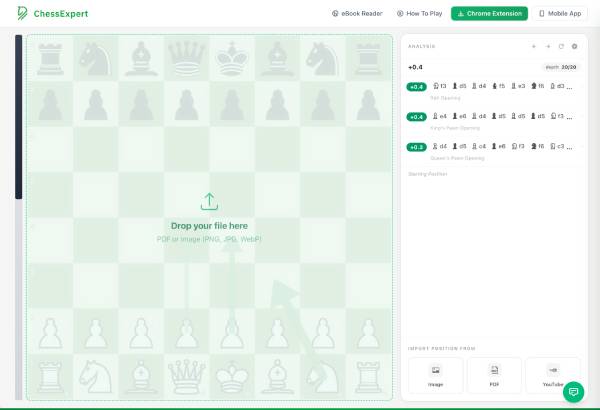
Add the chess book or lesson you want to study.
- 02 · Select a diagram
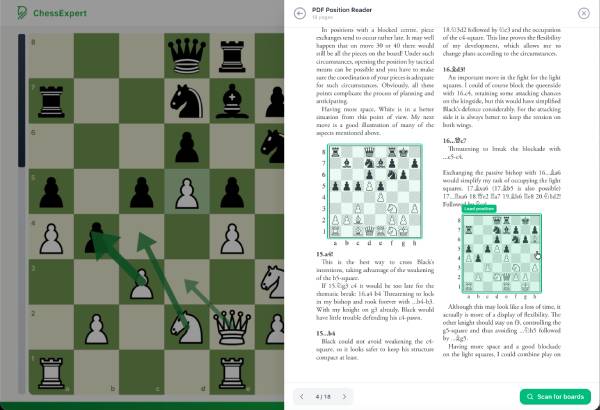
Click the position on the page—no manual setup needed.
- 03 · Explore the position
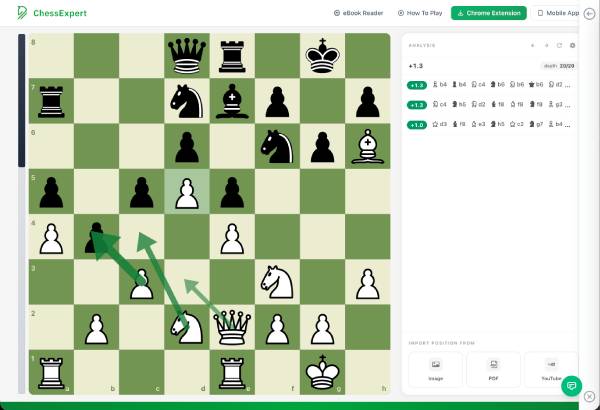
Move pieces and compare engine lines while you read.


A few things before you start.
Do I need to sign up?
You can start analyzing without signing up, and ChessExpert is free to use. Saved positions and exercises belong to your current profile, including a guest profile.
What can I analyze?
Upload a photo or screenshot, or open a PDF and select a chess diagram. Use the mobile app to photograph a board or the Chrome extension to capture one on a page.
What if a piece is recognized incorrectly?
Check the reconstructed board before analyzing. Use the board editor to correct the pieces and position details, then continue.
Can I create exercises from my own games?
Save a position from analysis or the Chrome extension. Open it in Saved Positions, choose Create exercise, and enter the full solution moves you want to practice.